GitHub Universe 2026: What You Need to Know

At Build in June, the GitHub Copilot app showed up as one item in my "things for your builders" list. Five months later, GitHub opened Universe in San Francisco with a much bigger claim: Copilot is now the system that runs software delivery, from the first idea to the merged pull request.
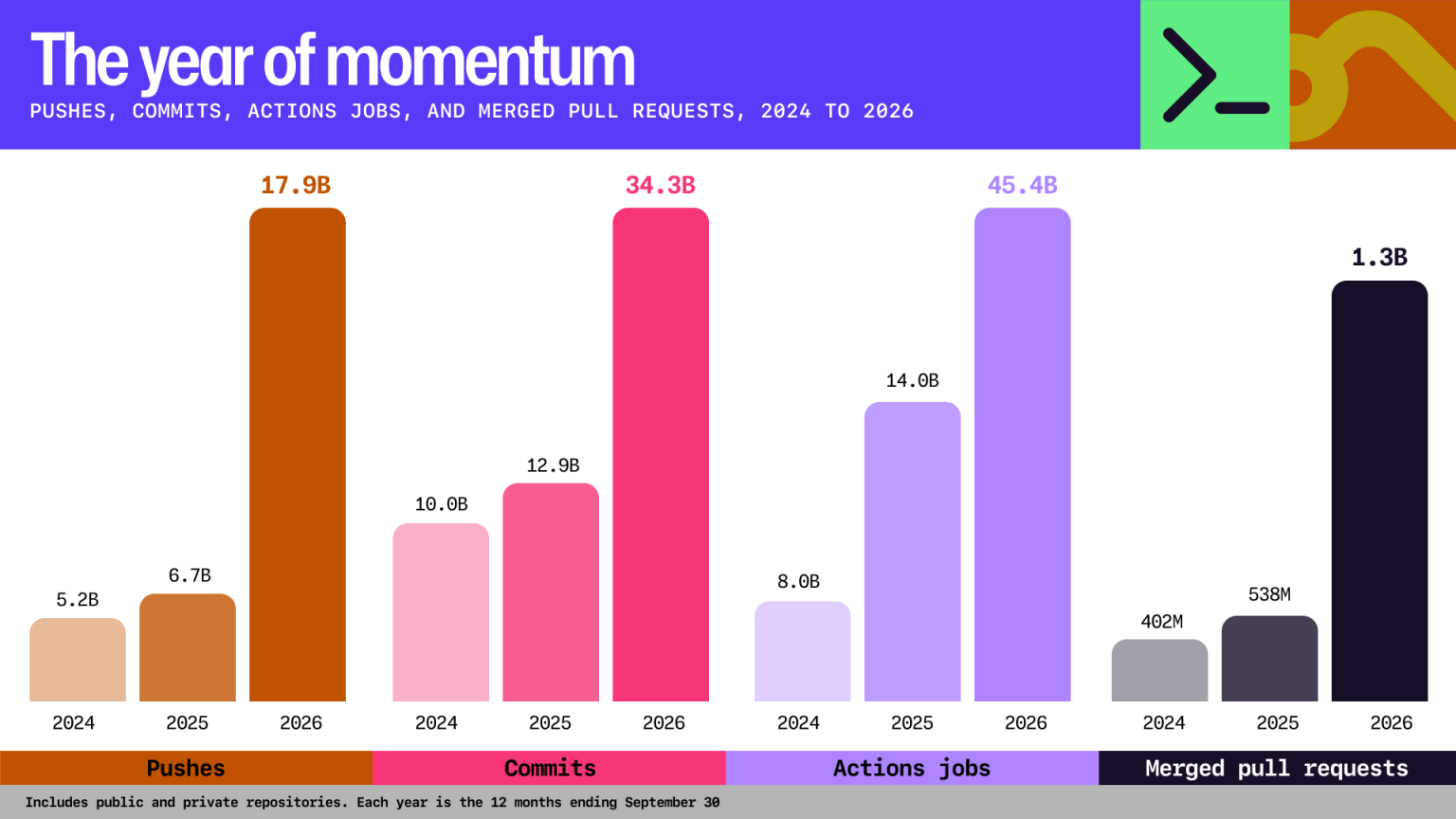
Jay Parikh framed it simply in his keynote post. The output that matters is completed work: a feature, a bug fix, a security patch. More code doesn't count unless it ships. Almost every announcement this week lines up behind that idea, and GitHub had the numbers to back up why it matters now. According to this year's Octoverse report, developers pushed code to GitHub 17.9 billion times in the past 12 months, more than 2024 and 2025 combined, and by September more than 40% of pull requests started with an agent's first draft.
 Jay Parikh
If you read the news with one question in mind, "how does a piece of work get from idea to merged with fewer handoffs?", the rest gets a lot easier to sort through.
Here are my big takeaways from this week's announcements.
Copilot Is Now Part of GitHub Enterprise
I'll start with the announcement that will matter most in budget conversations.
GitHub Enterprise now includes access to GitHub Copilot for every licensed user. Until now, organizations managed two separate things: how many Copilot seats they bought, and how much AI usage those seats consumed. Under the new model, there are no seats to count. You manage one thing, which is AI usage against your enterprise budget, metered from the first request using the policies and alerts you already have.
 Allison
A few details worth knowing:
- Nothing turns off when the budget runs out. Code completion and next edit suggestions keep working with no budget. Chat, code review, and cloud agents need available budget, but an exhausted budget never removes a user's access.
- There's no included allowance. This model has the same features and models as Copilot Enterprise, but it doesn't include monthly AI credits per seat.
- People without a GitHub Enterprise license can get the same access through Copilot Standalone at $10 per user per month.
- Availability: It's available now for GitHub Enterprise Cloud customers working with a GitHub or Microsoft account team. Self-serve is coming in stages. Copilot Business and Copilot Enterprise remain available, and existing customers can stay on their current plans.
For leaders, this changes the question from "how many developers get Copilot?" to "how much AI work do we want to fund, and where?" That's a better question, and the admin controls for budgets, model policies, and usage attribution that shipped over the past few months are now even more important. If you haven't looked at them yet, now's the time.
You Pick the Outcome, Copilot Picks the Model
Octoverse showed how fragmented model choice has become. In September, 61% of Copilot users who chose their own model used more than one, paid Copilot users worked with 47 distinct models, and no single model handled more than 25% of requests. That's a lot of decisions to push onto every developer.
 Allison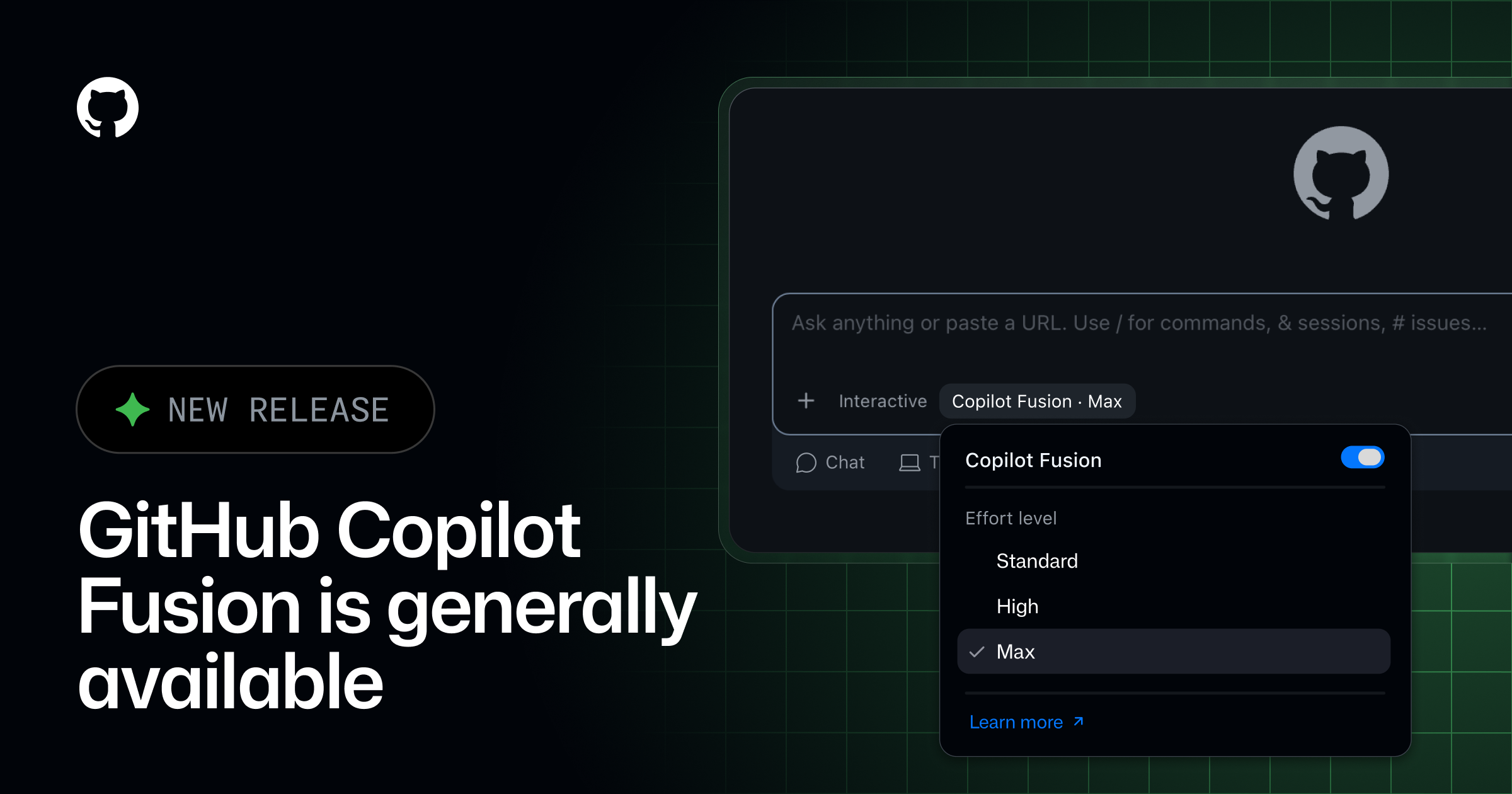
GitHub Copilot Fusion, the production version of the Project HydraFusion research preview, is now generally available on all Copilot plans in VS Code, the Copilot app, Copilot CLI, and JetBrains IDEs. You select Fusion, choose an effort level (Standard, High, or Max), and Copilot decides which models to use for each step of the task, sometimes combining several.
The headline number: on the Artificial Analysis Coding Agent Index, Fusion Max scored within two points of Opus 5.5 Max at half the cost and 40% less time per task. AT&T is already using Fusion Standard to cut unnecessary spend across its teams. Administrators still control which models Fusion is allowed to use and whether it's the default.
This pairs directly with the licensing change. Once you're paying for usage instead of seats, a router that matches the model to the job is a cost control as much as a productivity feature.
From Coding Assistant to Delivery System
The second big theme is that Copilot now works across the whole software delivery process, in the cloud, on whatever device you happen to be using.
Copilot projects (public preview) in the GitHub Copilot app let you describe a goal, attach context like repositories, design mocks, or Slack threads, and have Copilot run as many agents as the work needs across multiple repos. Results come back as pull requests for review. The app also added computer use in public preview for macOS and Windows, so Copilot can work through desktop apps that don't have an API, always with an approval prompt and an admin off-switch.
The new connected Copilot cloud experience, generally available on paid plans, makes every session portable. Start a task from your phone by voice, steer it from github.com, and finish it in VS Code or the CLI. It's the same session the whole way, running in a secure cloud sandbox with no one-hour limit. Teams and Slack users can kick off work with an @GitHub mention.
The cost detail here is important: your included GitHub Actions entitlement is becoming a single dollar-based compute pool that covers standard runners, Copilot's cloud sandboxes, and (on Team and Enterprise Cloud) larger runners. Billing for cloud sandbox usage starts in November 2026, so it's worth getting ahead of how your teams will consume that pool.
For work that should happen on its own, GitHub shipped two complementary options:
- Copilot Automations now learn from their own results. A triage automation can see whether people change the labels it applied, and a review automation can see which of its comments developers accept. It then proposes changes to its own prompt, tools, or triggers, which you approve or reject.
- GitHub Agentic Workflows is generally available on GitHub Free, Team, and Enterprise. You describe automation in a Markdown file, and it compiles into standard Actions YAML that runs on your existing runners and policies. Agents run read-only by default, inside a sandbox, with a threat detection job scanning every proposed change. Accenture shared that one team cut production errors from about 11,000 a day to under 1,000 with these workflows.
Review Is the New Bottleneck
When agents write a large share of the code, the constraint moves to review. Octoverse shows the volume: merged pull requests more than tripled in two years to 1.3 billion, and agents started 110 million pull requests in September alone.
GitHub's answer is to make Copilot a more trustworthy reviewer and approver. Copilot code review Max (public preview) runs several independent review agents on models from different providers, then uses an aggregation agent to reconcile their findings into one review. GitHub says it posted the highest F1 score on ReviewBench for high-severity issues. It's slower and uses more credits than the Lite and Balanced levels, so it's meant for the changes where a miss is expensive, like authentication logic or shared libraries.
Alongside it, Copilot approvals are now generally available. When an admin turns them on, Copilot's approval counts toward your required approvals, gets dismissed if new commits land, and can be limited to specific file paths. Approvals are off by default, which is the right call.
Agent Merge closes the loop. Click Watch and fix on a pull request, and Copilot fixes failing Actions workflows and merge conflicts in the cloud until the PR is ready. Combined with auto-merge, a pull request can go from approved to merged without anyone babysitting it.
My guidance: pilot Max and approvals on a small number of high-risk repositories first, and let your engineering leads decide where Copilot's sign-off is acceptable. That's a governance decision as much as a technical one.
Agents That Remember How Your Team Works
At Build, the big idea was that an agent's value depends on how well it understands your business. Universe brought that same idea to software teams with GitHub intelligence, a context layer built from your repositories, conventions, and history.
 Allison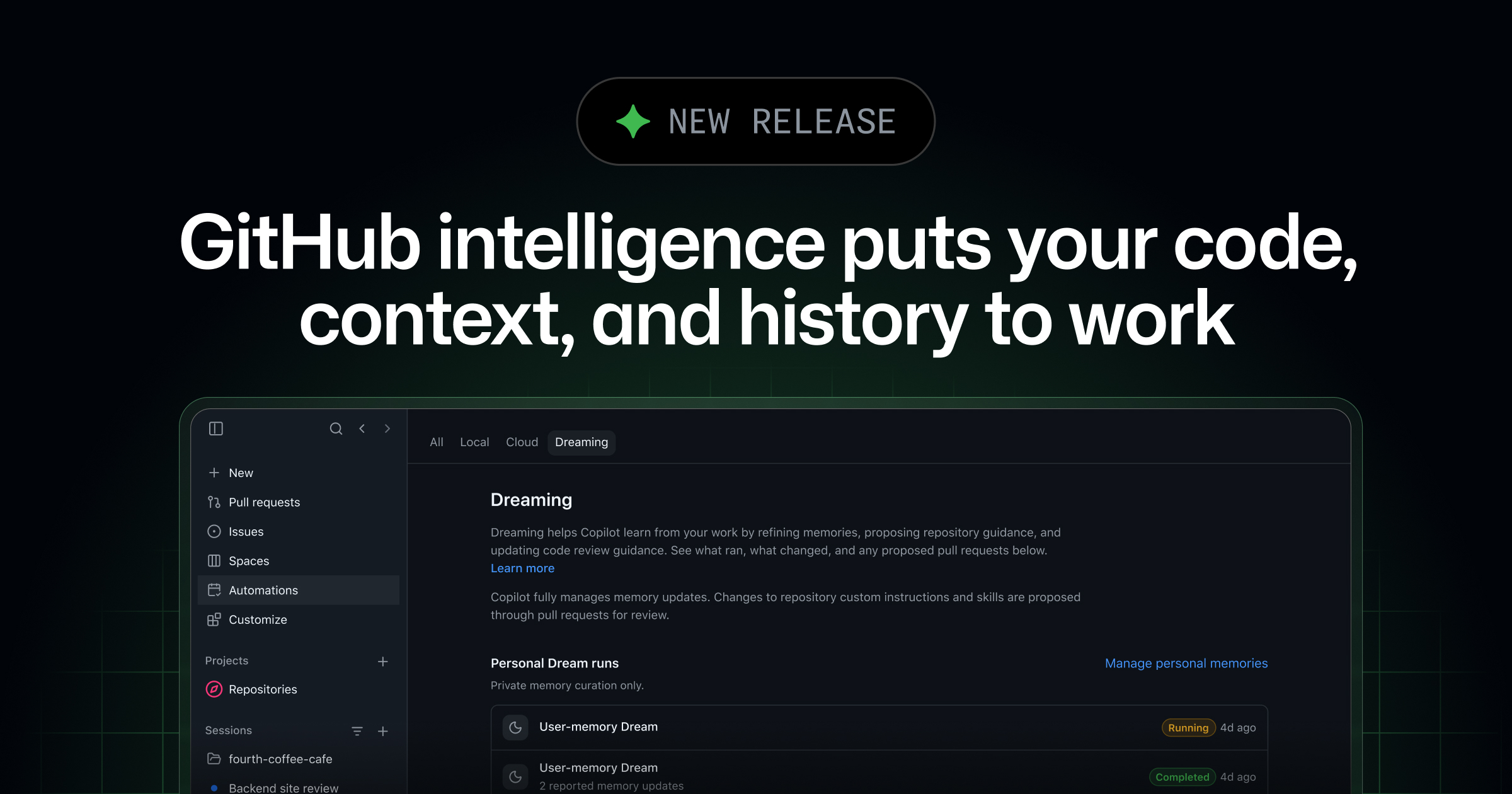
It has three parts:
- Copilot Memory is generally available on paid plans. Copilot remembers personal preferences and repository conventions across sessions and tools. In preview, 93% of reviewed CLI sessions that used memory showed better adherence to developer preferences.
- Copilot dreaming (public preview, opt-in) reviews past sessions and accepted code review feedback, then updates memories and proposes improvements to your team's skills and instruction files through pull requests.
- Cross-repository code search lets Copilot find relevant code, schemas, and documentation across your organization without cloning anything, which matters for migrations and bugs that span several services.
The practical effect is that agents stop starting from zero every session. Your team's knowledge accumulates instead of being re-explained.
Security Is Catching Up to Agent-Written Code
More code from more agents means more surface area, and GitHub shipped a long list of security updates to match. The ones I'd put in front of a security leader:
- Code scanning for AI applications (public preview, requires GitHub Advanced Security) flags agent-specific risks in pull requests, including indirect prompt injection, sensitive information disclosure, and agents with more permissions than their task requires. If your teams are building agents, this is the one to turn on first.
- AI Scan for repositories (public preview) scans an entire repository with an agentic scanner, including languages CodeQL doesn't support. It doesn't require a Copilot license and runs within a fixed time budget to keep cost predictable.
- Push protection for AI-detected secrets (public preview) uses a classifier built with Microsoft Applied Sciences to block secrets that don't match a known pattern. In early results, it more than doubled the number of pushes where a secret was caught.
- Dependabot reachability analysis (public preview for JavaScript and TypeScript on GitHub Enterprise Cloud, free during preview) tells you whether your code actually calls the vulnerable function, which helps teams cut through dependency alert backlogs.
- A security extension for the Copilot app (public preview) brings code scanning alerts and a
/security-reviewcommand into the same place developers are already working with agents.
A Few Things for Your Builders
- The Copilot SDK is becoming the Microsoft Copilot SDK. It's now the programmable interface for the shared agent harness used across Microsoft and GitHub products. Nothing changes for existing users right away, but it's a clear signal that GitHub's agent foundation and Microsoft's are converging.
- GitHub Actions now runs some jobs on AWS. Multi-cloud compute adds capacity for standard 2-core and 4-core Linux runners. It's automatic on Free, Pro, and Team and opt-in on Enterprise Cloud. If your network allowlists or Entra Conditional Access policies only allow Azure or Microsoft IP ranges, update them now from the
actionslist in GitHub's meta API, or workflows may start failing. - Actions workflow lockfiles are generally available, which pins the exact versions of actions your workflows use.
- Replica is a new open-source (MIT) prototyping tool from GitHub Design that lets designers, PMs, and engineers build interactive prototypes from your own design system using natural language.
- Infrastructure: GitHub added 4 million CPU cores, 160 PB of storage, and 50 Tb/s of network capacity this year, and expects to finish its multi-region Azure migration early next year. With agent traffic driving activity this high, that headroom matters.
The Takeaway
GitHub spent this week arguing that the job of a developer is shifting from writing code to directing and reviewing work, and it rebuilt the product and the pricing around that shift. Fusion handles model choice, projects and automations handle execution, Max and approvals handle review, and memory keeps the whole system learning.
For leaders, two decisions come out of this week. First, how you'll fund AI usage now that it's a budget line instead of a seat count. Second, where you're comfortable letting agents take a step without a person in the loop, whether that's an automation updating its own prompt or Copilot approving a pull request. GitHub made all of those steps optional and controllable. Your teams will need clear guidance on when to turn them on.
The Octoverse data makes it hard to wait. Among repositories created this year, the ones set up for agents from day one logged eight times as many commits as the ones that weren't.
What's Next
Universe wraps up today, so I'll update this post if day two brings anything significant. After that, the next big stop is Microsoft Ignite, November 17–20 in San Francisco, where I'd expect several of this week's previews to show up with updated timelines.